In today's globalized world, choosing the right professional translation software is essential for businesses. With the translation market projected to reach $46 billion by 2027, the stakes are high. Numerous options exist, but not all software solutions meet industry standards. According to Dr. Elena Fabri, a renowned expert in translation technology, "Effective translation tools can bridge gaps and foster understanding across cultures."
When selecting professional translation software, consider features such as ease of use, language support, and integration capabilities. Many tools claim to offer accuracy but may lack context nuances. It's not uncommon to find inconsistencies in automated translations. Businesses must be cautious and not solely rely on algorithms. Inaccurate translations can lead to miscommunication and lost clients. Reflecting on these challenges is vital for making informed choices.
Investing time in research and comparison can lead to better outcomes. Understanding the specific needs of your team is equally important. Not every software fits every business model. Often, organizations face a dilemma: prioritize cost or quality? Clearly, this decision warrants careful thought and consideration. Choosing wisely in the realm of professional translation software can significantly impact global outreach and brand reputation.

When selecting translation software, understanding your specific translation needs is crucial. Begin by assessing the scope of your projects. Are you translating documents, websites, or marketing materials? Each type requires different levels of nuance and linguistic accuracy. According to a report from the Globalization and Localization Association, over 55% of companies recognize content quality as a top concern when choosing translation tools.
The purpose of your translations plays a major role as well. Are you aiming for localization, or simply direct translation? Research indicates that about 76% of consumers prefer to purchase products in their native language. This highlights the importance of not just translating words, but also adapting content to resonate culturally. Furthermore, remember that some software may not perform well in niche industries, resulting in inaccuracies that could harm your brand image. It’s essential to test how well the tools handle common terminology from your sector.
Balancing efficiency and quality can be tough. Even the best software has limitations. Some tools might lack a full understanding of idiomatic expressions or localized terms. This can lead to translations that miss the mark. Regular feedback and revisions are vital. Continuous evaluation ensures the software meets your evolving translation needs.

When selecting professional translation software, it's crucial to evaluate the features it offers. A recent survey revealed that 70% of translators prioritize user-friendly interfaces. A simple, intuitive design can save time and reduce the learning curve. Yet, many tools still lack clear navigation, complicating the translation process for users.
Another key feature is the availability of support for various languages. According to industry data, the demand for translation services will grow by 20% in the next five years. Software that supports diverse languages ensures versatility. However, not all platforms provide equal quality across languages. Some may excel in major languages but struggle with less common dialects, limiting your choices.
Collaboration tools are also essential. Many translators work in teams, and seamless communication can enhance productivity. A study showed that teams using integrated collaboration features were 30% more efficient. Unfortunately, certain software options still lack robust collaborative capabilities, making it challenging for teams to share and edit documents effectively. Evaluating these features is vital for making an informed choice.
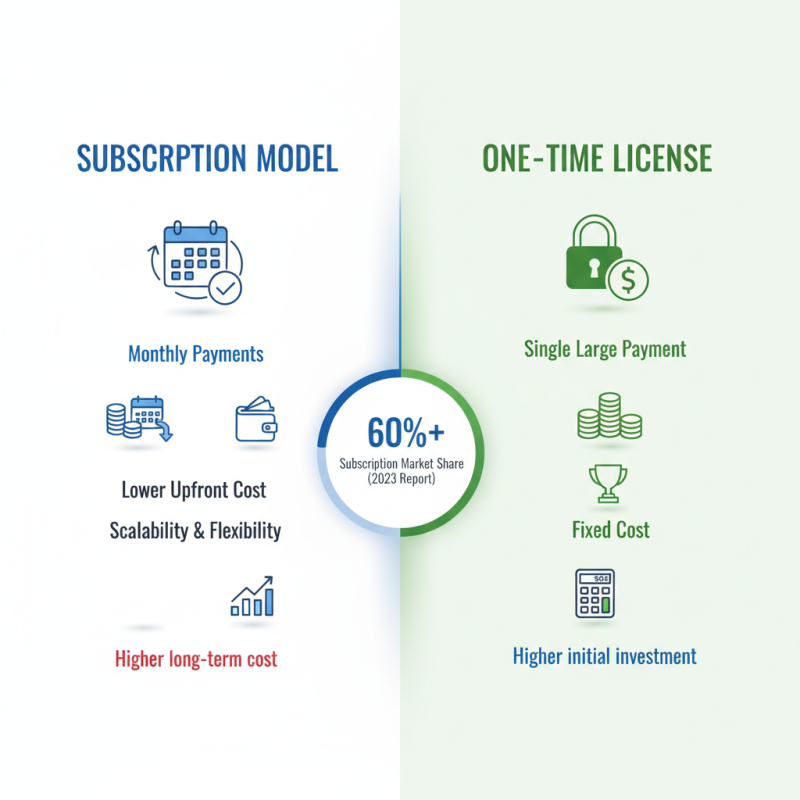
When selecting professional translation software, pricing models can greatly influence your decision. The market offers various pricing schemes, from subscription-based to one-time licensing fees. According to a 2023 industry report, subscription models account for over 60% of software choices, primarily due to their flexibility. Users can opt for monthly subscriptions, allowing them to avoid large upfront costs while easily scaling their usage. However, this model might accumulate to higher total costs over time.
Cost-effectiveness shouldn't just focus on initial pricing. Consider the return on investment (ROI) associated with each software type. A study revealed that businesses utilizing cloud-based solutions see a 30% increase in productivity due to instant access. Moreover, hidden costs, such as training or additional features, can catch users off guard. While cheaper options exist, they might lack essential functionalities that reduce overall efficiency. This paradox emphasizes the importance of evaluating not just price, but the comprehensive value delivered. Making an informed choice requires careful thought on both short-term budgets and long-term needs.
When choosing professional translation software, user reviews and ratings are invaluable. They offer real insights from actual users. A high rating often indicates reliability and effectiveness. However, not all reviews are created equal. Some may be overly positive or negative, reflecting personal biases. It's crucial to look for patterns in feedback. Consistent praise or complaints can guide your choice effectively.
Consider various platforms to find diverse opinions. Many users share specific experiences, which can highlight strengths and weaknesses. A software that excels in accuracy may struggle with user interface. This dichotomy is essential to understand. A product’s usability can make or break your translation experience. Pay attention to comments about customer support. Lack of assistance can become a significant hassle later.
While star ratings capture overall sentiment, they may not tell the whole story. Personal anecdotes often provide context missing from numerical scores. Look for common themes in user experiences. These reflections can expose the less visible aspects of software. Recognizing both the highs and lows allows for more informed decisions. The right choice relies on balancing features with user experiences.
Choosing the right professional translation software can greatly enhance productivity. Integrating this software into existing workflows is crucial. A seamless connection with current processes reduces friction and enhances efficiency. Choose software that is user-friendly. Intuitive interfaces save time during training and use.
To boost efficiency, look for tools that offer collaborative features. Team members can work together in real-time. This fosters better communication and reduces translation errors. Integration with project management tools helps track progress effortlessly. You can see where things stand at a glance.
Think about compatibility too. Ensure the software works with different file formats. It avoids conversion issues later. Don’t overlook customer support options. Knowing help is available can alleviate stress. Expect some hiccups as you adapt, but learning from these challenges is key to improvement.
| Tip | Description | Benefit |
|---|---|---|
| 1. Assess Your Needs | Determine the specific language pairs and document types you require. | Helps in choosing software that meets your translation demands. |
| 2. Check Integration Capabilities | Look for software that integrates well with your existing tools. | Enhances productivity by streamlining workflows. |
| 3. Evaluate User Interface | Choose a software with an intuitive and user-friendly interface. | Reduces the learning curve and increases efficiency. |
| 4. Look for Customization Options | Check if the software allows for personalization to better fit your needs. | Increases user satisfaction and effectiveness. |
| 5. Review Translation Memory Features | Ensure the software includes translation memory capabilities. | Saves time and ensures consistency across translations. |
| 6. Examine Support and Community | Assess the level of customer support and user community available. | Provides assistance and resources for troubleshooting and learning. |
| 7. Look for Accessibility Features | Check if the software is accessible on multiple devices and locations. | Increases flexibility in working environments. |
| 8. Compare Pricing Models | Evaluate costs and see if they fit within your budget. | Ensures you find a solution that provides value for money. |
| 9. Test with a Trial Version | Utilize trial versions to gauge software performance and usability. | Helps in making an informed decision before committing. |
| 10. Seek User Reviews | Research what existing users have to say about the software. | Provides insights into reliability and performance. |